
A PDF reader for Apple TV.
Apple TV has no built-in app for opening PDF files. Blad is one: it reads PDFs straight from your own storage, shows them as whole spreads on the TV and keeps small print sharp when you zoom in, all with the Siri Remote.

Out now, only from the App Store on Apple TV. Blad for iPad is coming soon.
Five titles free. Then one purchase. No subscription.
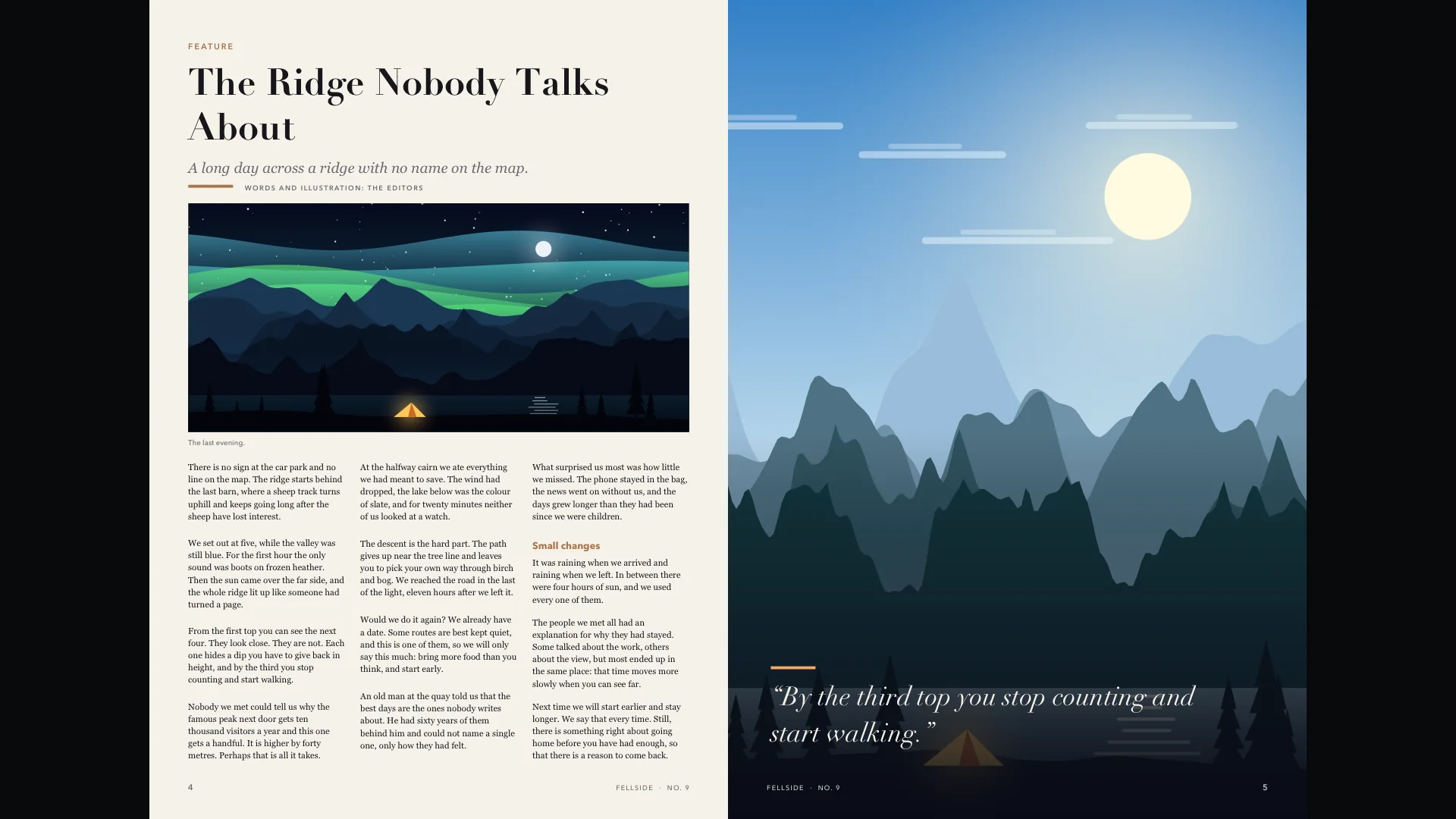
Zoom in. It stays sharp.
Click once and the page fills the width of the TV. Blad draws the page again for the zoom level you are at, in full 4K and wide colour, so small print stays crisp instead of going soft.
Scroll with the touch surface and keep reading onto the next page without zooming out. A small map in the corner shows where on the page you are.
To get closer, zoom on in steps, up to eight times the size of the whole spread, and move around the page with the arrows. Wide pages, such as slides and drawings, are shown one per screen.
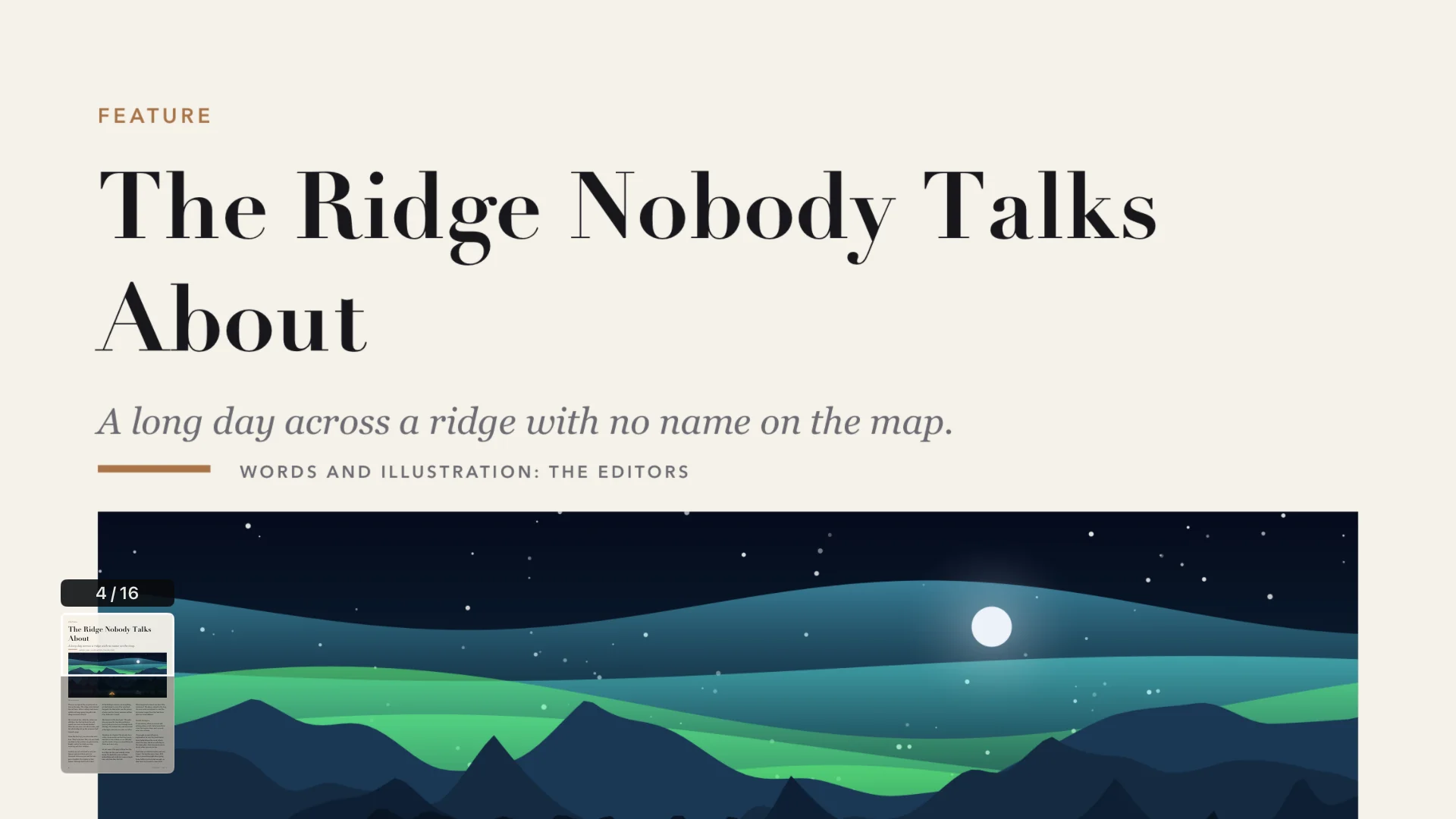
Small print? Read the page as text.
Press Play/Pause and the page becomes one clean column in a typeface made for reading, in three sizes and three themes: Night, Paper and Sepia.
Text mode needs a PDF with real text. Scanned pages have none.
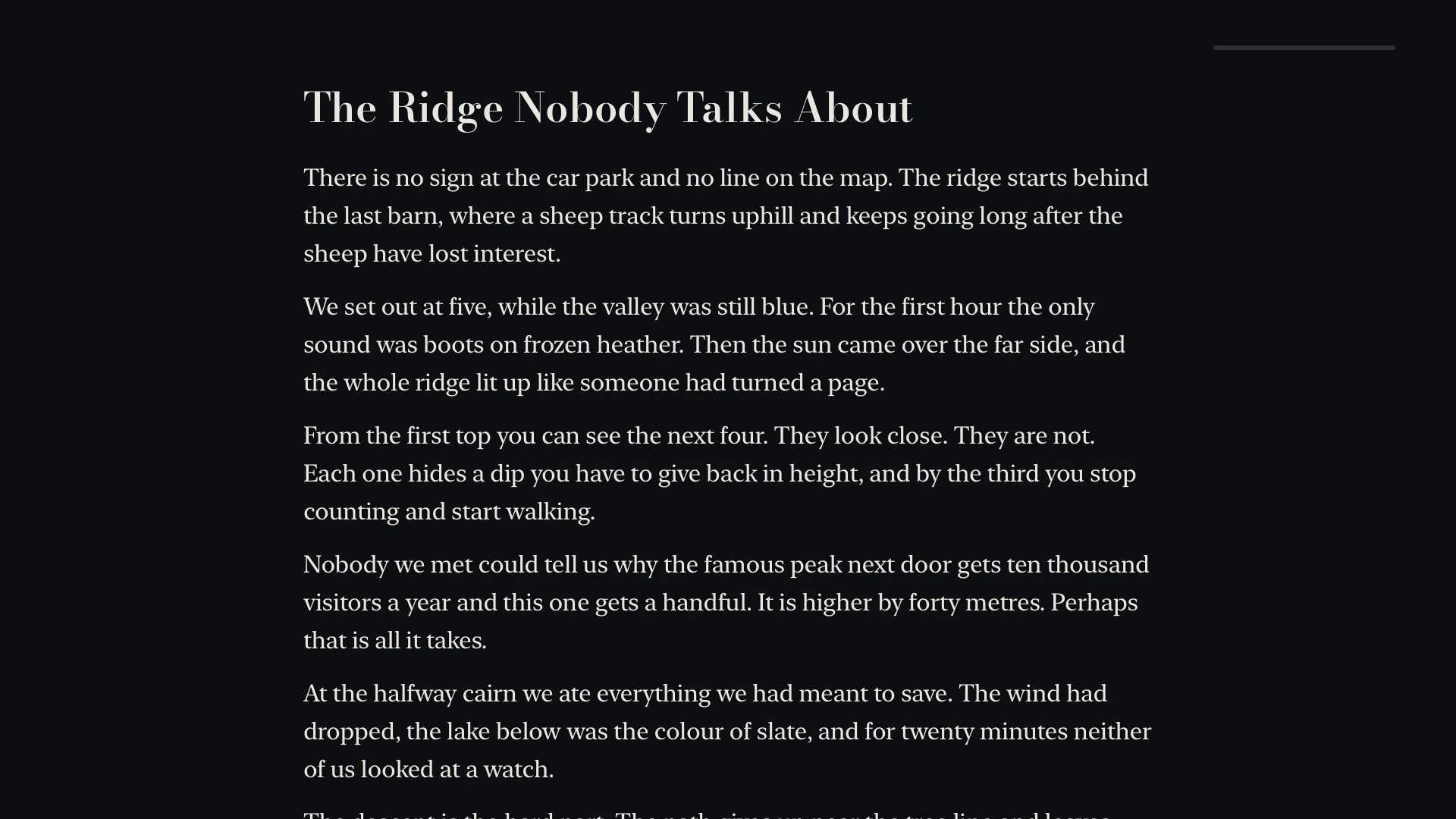
Every PDF with its cover, in one library.
Blad finds the PDFs in the folders you choose and shows them with their covers. Search, filter by what you have read, and pick up where you left off, from the app or straight from the Top Shelf.
A PDF with a password opens when you enter the password, and Blad remembers it.
Your files stay where they are.
Blad has no store and no catalogue. It reads the files you already have, from the storage you already use, and it only ever reads: nothing in your storage is changed, deleted or shared.
- Get BladOpen the App Store on your Apple TV, search for Blad and download it. The download is free, and so are the first five titles you open.
- Connect your storageOpen Sources and pick where your files are. For cloud services you sign in on your phone with a QR code, so there is no password to type with the remote. Then choose the folders and files Blad may read.
- ReadYour titles appear in the library with their covers. Click one, and Blad fetches the file to the Apple TV and opens it. Next time it opens on the page you left.
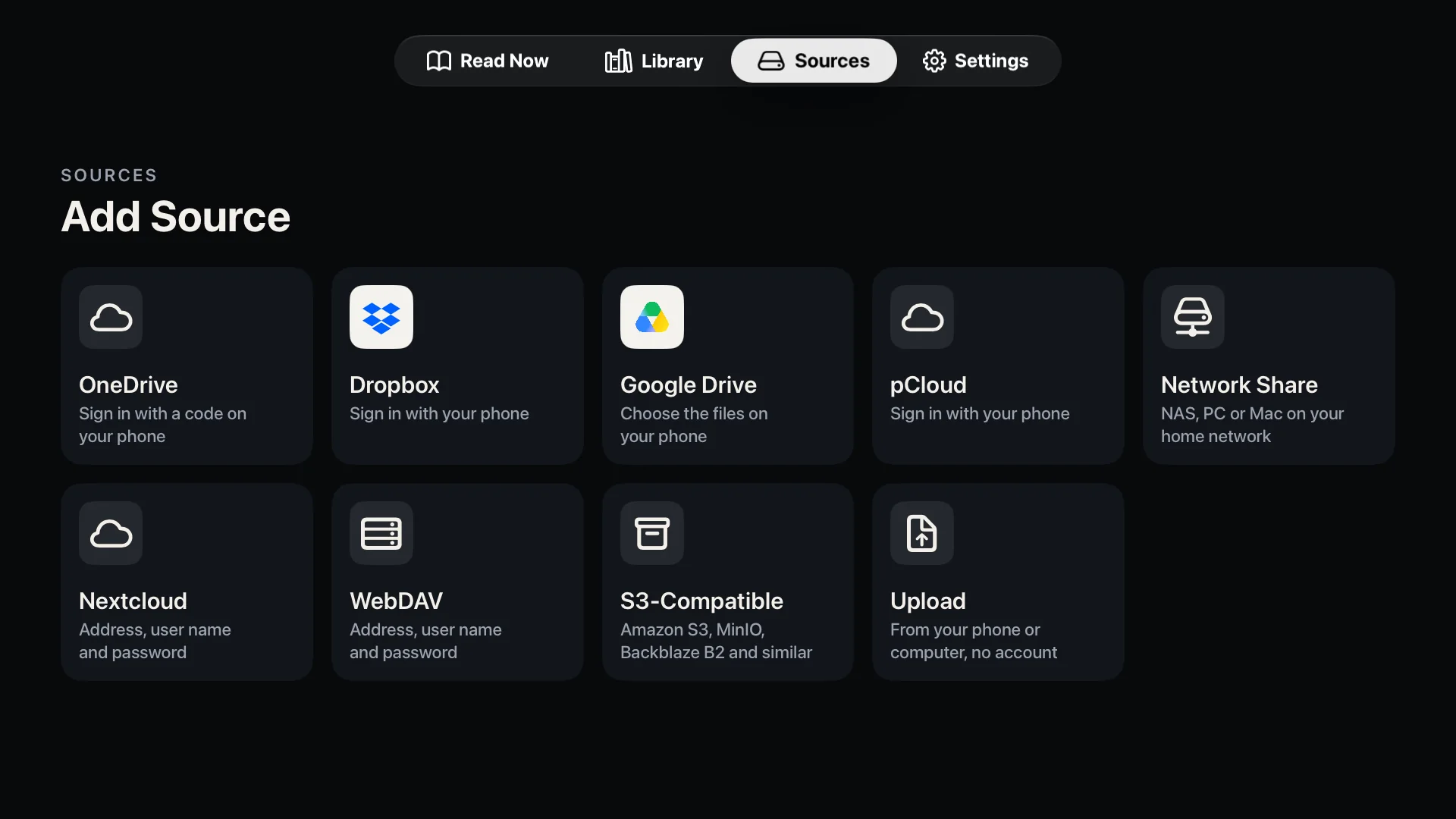
Blad reads from
- Cloud services
- OneDrive
- Dropbox
- Google Drive
- pCloud
- At home or on your own server
- Network shares (SMB)
- Nextcloud and WebDAV
- S3-compatible storage
- OPDS: Komga, Kavita, Calibre
- No account needed
- Straight from your phone
No cloud account and no server? Choose Upload under Sources, scan the QR code with your phone and send the files over your home network. Upload takes PDF, EPUB, CBZ and CBR files. Step by step on the support page.
The limits, stated plainly.
- Apple TV
- Any Apple TV running tvOS 26 or later.
- File formats
- PDF (also with a password), EPUB, and comics in CBZ, CBR and CBT. Not MOBI or Kindle formats, and not comic archives that have a password, are split into several files or are packed as 7z (CB7).
- Copy protection
- Files with DRM cannot be opened. That rules out most e-books bought with a lock, and magazines that only live inside another reading app.
- Text mode
- Showing a PDF page as plain text needs a page with real text. Scanned pages have none, and in a few PDFs the fonts do not say which letters they hold; Blad then says that the text cannot be read.
- Upload from a phone
- Takes PDF, EPUB, CBZ and CBR files. They are kept in the app's cache on the Apple TV, which tvOS can clear when space runs low, so keep your originals.
- Price
- Free to download, and the first five titles are free. After that, a single in-app purchase of US$8.99 unlocks the full version, with no subscription. The price in your country is shown in the app.
- Privacy
- No account with us, no analytics and no advertising. Privacy policy.
- Languages
- The app is in English and Norwegian.
- iPad and iPhone
- Blad for iPad is coming soon. There is no iPhone version yet.
Good to ask.
Can Apple TV open PDF files?
Not by itself: tvOS has no built-in PDF viewer and no Files app. You need an app such as Blad, or you can mirror the screen of an iPhone, iPad or Mac with AirPlay. How to read a PDF on Apple TV compares the two.
How do I get a PDF onto my Apple TV?
Connect the storage where the file is: OneDrive, Dropbox, Google Drive, pCloud, a shared folder on a computer or NAS, Nextcloud or another WebDAV server, S3-compatible storage, or an OPDS catalogue on your own server. Or send the PDF from your phone or computer over your home network by scanning a QR code on the TV.
Does Blad work with scanned PDFs?
Yes. Scanned pages are shown and zoomed like any other page. Only text mode is unavailable, because a scanned page has no text to show.
Is Blad only for magazines?
No. Any ordinary PDF without copy protection opens: magazines, manuals, reports and scanned documents. Blad is a reader, so there is no annotation, form filling or editing.
Blad, format by format.
- Magazine reader for Apple TVWhole spreads in 4K, and a shelf that sorts issues by magazine.
- E-book reader for Apple TVEPUB in large, calm type, with bookmarks and search.
- Comic reader for Apple TVCBZ and CBR comics as two-page spreads, with zoom to page width and closer.
- How to read a PDF on Apple TVAirPlay or a reader app: the two ways, step by step.
- Blad at workMeeting rooms, training rooms and the screen on the wall: what Blad does there, and its limits.
- SupportEvery source step by step, and how to reach us.

Your library, on the TV in your living room.
Blad for Apple TV is out now, only from the App Store on Apple TV. Blad for iPad is coming soon.