Blad
Blad at work

Blad at work.

Blad is a reader for Apple TV. It opens PDF files from the storage your organisation already uses and shows them on the TV in the meeting room, the training room or the workshop, where someone turns the pages with the remote. It suits small teams who read documents together. It is not digital signage, and it has no central administration.

Out now, only from the App Store on Apple TV. Blad for iPad is coming soon.

Five titles free. Then one purchase. No subscription.

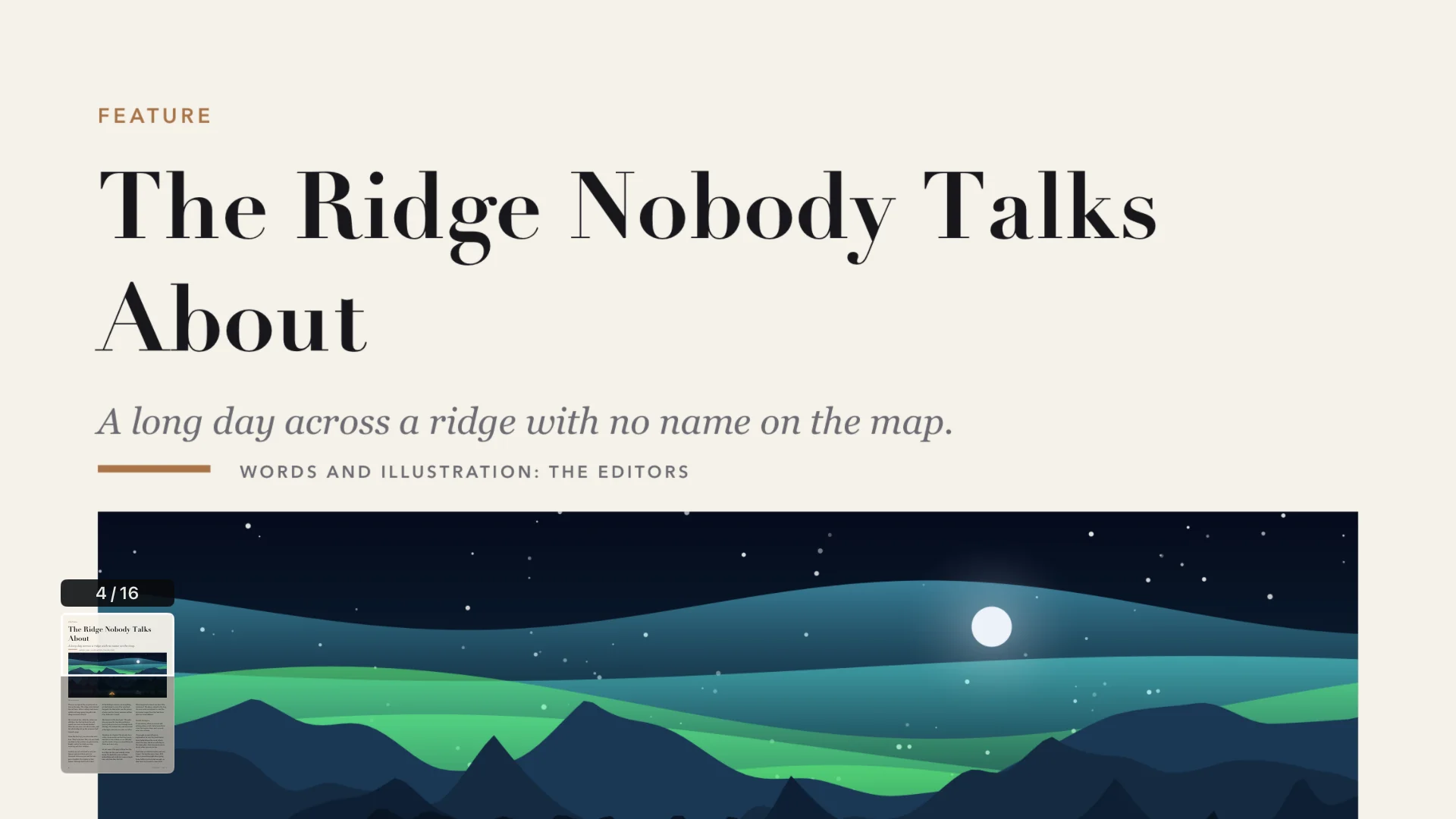
A magazine page zoomed to the full width of the screen, with a small map of the page in the corner
For whom

Who it is for, and who it is not for.

Blad fits when

  • people read the same document together: board papers, a report, a handbook
  • the files are PDFs, and they are in OneDrive, in Dropbox, on a file server or in Nextcloud
  • someone in the room holds the remote and turns the pages
  • you have one Apple TV or a few, and can set each one up by hand

Look elsewhere when

  • a screen should run by itself and change pages on a timer
  • the documents are in SharePoint or Teams and your organisation does not let outside apps read them
  • you want to open Word, Excel or PowerPoint files without exporting them to PDF
  • you need central configuration, access control per person or a log of who opened what
  • you need a signed agreement on support or data processing
Where it fits

Five rooms, and what to know in each.

In every one of them, Blad does the same thing: it shows the pages of a PDF, large and sharp, and a person decides when to turn the page.

The meeting room

Board papers, the monthly report, a draft contract. The document is in the library on the Apple TV, so nobody has to find the right cable or share a laptop screen with their inbox in the corner. Left and right turn the page, and a click zooms to the width of the page, and closer when the figures are small, so the far end of the table can read them. Next time, Blad opens the document on the page where you stopped.

Good to know: The file is downloaded to the Apple TV and kept in the app's cache. Titles you have started can also show on the Apple TV Home Screen. Decide which documents belong on a shared device.

The training room and the classroom

Course material, a handbook or a set of exercises, shown two pages at a time or one page across the full width. The person teaching can walk around with the remote instead of standing at a laptop. Slides exported to PDF work too: wide pages are shown one per screen, and left and right move one slide at a time.

Good to know: Blad shows pages and nothing more. There is no pointer, no highlighting and no filling in of forms, and links in a PDF cannot be followed.

The workshop and the lab

A manual, a procedure or a checklist on the screen on the wall, large enough to read from the bench. Zoom to the width of the page, or closer, and scroll with the remote. A wide drawing or plan gets the screen to itself and can be enlarged in steps, up to eight times. A page with real text can also be shown as plain text in large type.

Good to know: Blad keeps the screen awake for 30 minutes after the last press on the remote, as long as Keep Screen Awake is on, which it is to begin with. After that the Apple TV starts its screen saver and goes to sleep after the times set in tvOS Settings, and Blad opens the document again on the page you left.

The showroom and the reception

A catalogue, a price list or a brochure that someone pages through together with a customer. The covers in the library make it quick to find the right one, and whole spreads look the way they were designed.

Good to know: Someone has to hold the remote. Blad does not page through a document by itself, and whoever holds the remote can open everything in the library.

Choirs, bands and congregations

Song sheets, lyrics and orders of service on one screen that everyone can see, instead of a pile of photocopies. Two pages side by side suit most sheets, and a click zooms in when the print is small.

Good to know: The page turns when someone presses the remote, so one person needs a free hand. Whether you may show printed music and lyrics on a screen depends on your licence.

How it fits your IT

Where the files can live, and how Blad reaches them.

The Apple TV connects to your storage itself. Nothing passes through a server of ours, and Blad asks for read access only: it does not change, delete or share anything.

Blad reads from

  • Cloud services
    • OneDrive
    • Dropbox
    • Google Drive
    • pCloud
  • At home or on your own server
    • Network shares (SMB)
    • Nextcloud and WebDAV
    • S3-compatible storage
    • OPDS: Komga, Kavita, Calibre
  • No account needed
    • Straight from your phone
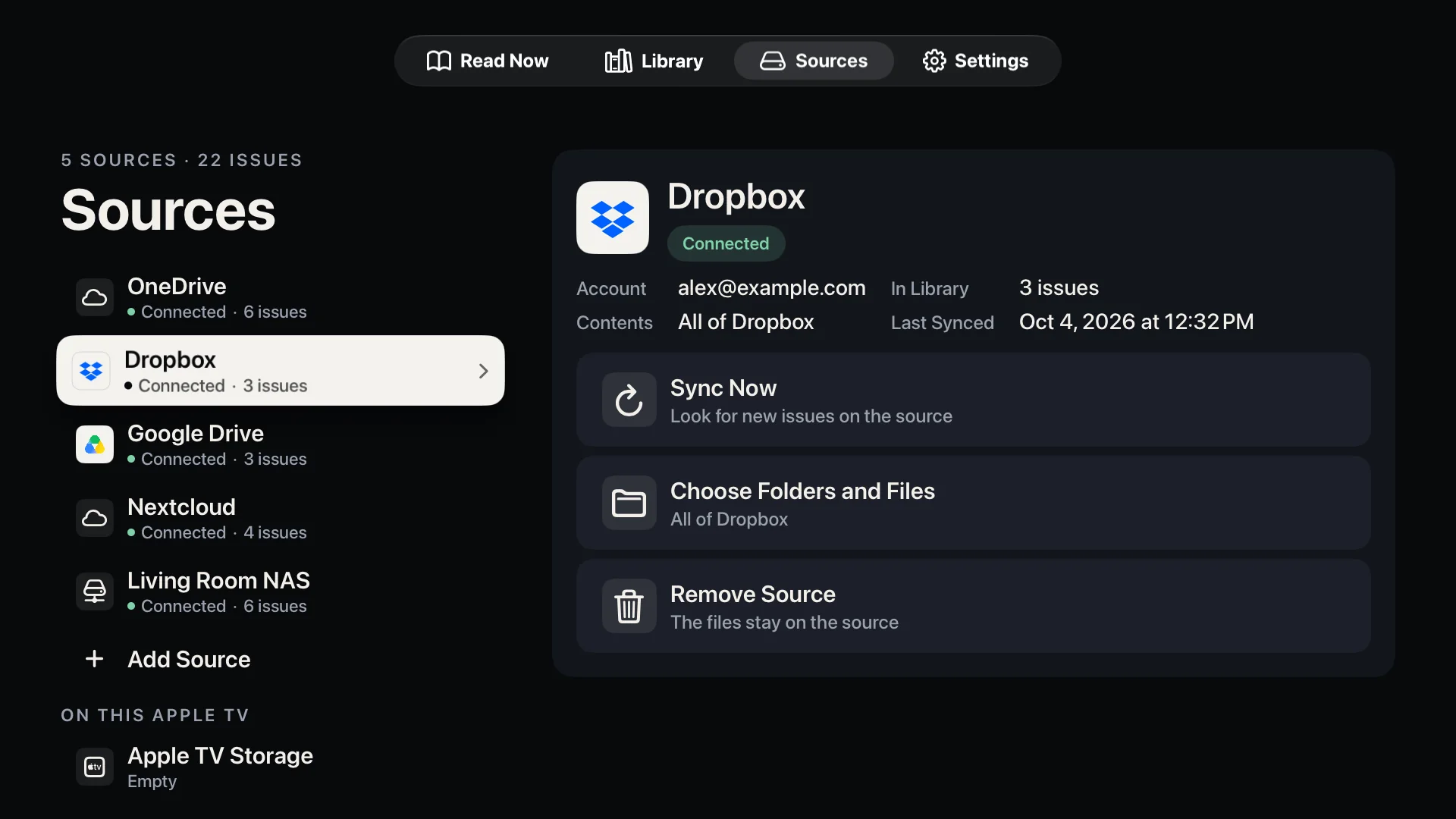
The Sources screen with OneDrive, Dropbox, Google Drive, Nextcloud and a NAS connected
Microsoft 365
Blad signs in to OneDrive with Microsoft's device code sign-in: the TV shows a code, and a person signs in on a phone or computer. It asks for three delegated permissions: Files.Read, offline_access and User.Read. With a work or school account, Blad lists that person's own OneDrive. Document libraries in SharePoint and Teams take a second step: the row Shared Libraries on the source asks the person to sign in once more and to grant one more permission, Sites.Read.All. After that, the libraries that person has access to can be browsed and chosen. An organisation may refuse that permission or require an administrator to approve it; Blad says so, and the person's own files work as before. Files that others have shared with the person one by one are not listed. Many organisations block this kind of sign-in: Microsoft's security defaults do, and since 1 July 2026 that applies to every new tenant. Others let only an administrator approve apps from outside. Blad tells you when the sign-in is blocked, and then your IT department has to allow it and approve the app, or the files have to come from another source. We have tested OneDrive with personal accounts only, and the shared libraries only against the example data in Microsoft's documentation, never against a real tenant. Try a work account with the five free titles before you plan around it.
Dropbox and Google Drive
With Dropbox, Blad lists the signed-in person's own folders. In a Dropbox team that uses a shared team space, the team's folders are listed next to the person's own and can be chosen in the same way. With Google Drive, Blad sees only the files a person picks, one by one, in Google's own file picker. A Google Workspace administrator can restrict which outside apps people may sign in to, so your IT department may need to approve Blad there as well. We have not tested either with a business account, and the team space not with a real team account.
File server or NAS
Enter the server's address, a user name and a password, and choose the shared folder. Blad uses SMB 2 or later and connects over your local network. Give it an account of its own with read access to the folders it needs and nothing else. We have tested against Windows file sharing with a local account. A server that accepts only Kerberos sign-in from domain members is something we have not tested. When the password is changed, choose Edit Sign-In on the source: it keeps its folders, its covers and the reading progress. The same goes for WebDAV, S3 and OPDS sources.
Nextcloud, WebDAV and S3
Enter the address, a user name and a password (for Nextcloud an app password), or for S3-compatible storage the endpoint, the bucket and the access keys. The server needs a certificate that the Apple TV trusts: Blad refuses self-signed and expired certificates. Unencrypted http is accepted only for a server on the local network.
OPDS catalogues
A library server that publishes an OPDS catalogue, such as Komga, Kavita, Calibre or Calibre-Web, is added with its address and a user name and password, or an API key. The same rules for certificates and http apply. Blad only reads from the catalogue and sends no reading progress back to it. We have tested this against our own test server, written from the servers' source code, and not against the servers themselves.
From a laptop, with no account
Choose Upload on the Apple TV, scan the QR code or type the address into a browser, and send the files. The laptop or phone must be on the same network as the Apple TV, and a guest network that keeps devices apart will stop it. The transfer is plain http inside your network, with a random code in the address, and only while that screen is open. Upload takes PDF, EPUB, CBZ and CBR files.
Installing on many Apple TVs
Apple TV can be enrolled and supervised in a device management service (MDM), and such a service can install App Store apps without anyone touching the remote. We have not tested installing Blad that way. Blad reads no managed app configuration, so sources cannot be pushed out: someone adds them on each Apple TV. If the Apple TVs are signed in to the same iCloud account, the list of sources follows between them, but you may have to sign in to each source again on each device.
Buying
Blad is free to download, and the first five titles are free. The full version is then a one-time in-app purchase, made on the Apple TV with the Apple Account that is signed in there for purchases. Apple's volume purchasing (Apps and Books in Apple Business and Apple School Manager) cannot buy or assign in-app purchases, and Managed Apple Accounts cannot make purchases, so it takes an ordinary Apple Account with a payment method. Apple's terms let an organisation use an app for one person on several devices, or for several people on one shared device. As we read that, a shared Apple TV needs its own purchase. The receipt comes from Apple, not from us.

Privacy and security

What we see, and what stays on the Apple TV.

The short version: we see nothing, and the Apple TV keeps more than you might expect. The full text is in the privacy policy.

What reaches us
No files, no passwords and no sign-in keys. There is no account with us, no analytics and no advertising. The app talks to your storage directly.
Sign-in through blad.app
Signing in to Dropbox and pCloud passes a one-time value through a small relay on our website, so nobody has to type a long code with the remote. The relay keeps it until the Apple TV has fetched it, for ten minutes at most, and it can be fetched once. For Dropbox the value is useless without a secret that never leaves the Apple TV; for pCloud it is encrypted so that only the Apple TV can read it. Picking files for Google Drive also opens a page on blad.app, which sends you on to Google. OneDrive, file servers, WebDAV, S3 and OPDS catalogues do not involve our website.
Passwords and sign-in keys
Kept in the Keychain on the Apple TV, separately for each tvOS user. With iCloud sync on, they are also placed in the iCloud Keychain of the Apple Account on the device. iCloud sync is on by default and can be turned off under Settings in Blad.
Copies on the Apple TV
A document is downloaded to the Apple TV before it is read, and it is kept in the app's cache together with the file list and the covers. Downloaded files may use up to 2 GB before the oldest are deleted. Removing a source in Blad deletes its sign-in, its file list, its covers and its downloaded files.
Who can open what
There is no sign-in and no PIN inside Blad. Whoever holds the remote can open everything the Apple TV has been given access to. Connect only folders that everyone in the room may see.
PDFs with a password
Open when the password is entered. Blad then remembers it for that file, in the Keychain, so the next person is not asked. PDFs encrypted with a certificate do not open, and neither do files with DRM.
The one request to us
At most once a day, the app asks blad.app whether there is a newer edition of the short guide that comes with it. The request carries nothing about you, your library or your files. Remove the guide from the library and the app stops asking.
What we do not offer
No data processing agreement, no service level agreement, no audit log and no dedicated support for organisations. The ordinary terms of use apply.
To be clear

What Blad is not.

  • Not digital signage. It does not turn pages by itself, loop or follow a schedule, and it keeps the screen awake for no more than 30 minutes after the last press. A person operates it with the remote.
  • Not a presentation tool. There is no pointer, no notes and no animation. For a presentation you give once, AirPlay from your own laptop is often simpler: how the two compare.
  • Not a document system. There are no versions, no approvals, no access control and no logs. Blad reads the files it is given.
  • Not an Office viewer. Word, Excel and PowerPoint files have to be exported to PDF first.
  • Not an enterprise product. There is no central configuration, no volume licence and no agreement beyond the ordinary terms.
Good to know

The limits, stated plainly.

Apple TV
Any Apple TV running tvOS 26 or later.
File formats
PDF (also with a password), EPUB, and comics in CBZ, CBR and CBT. Not MOBI or Kindle formats, and not comic archives that have a password, are split into several files or are packed as 7z (CB7).
Copy protection
Files with DRM cannot be opened. That rules out most e-books bought with a lock, and magazines that only live inside another reading app.
Text mode
Showing a PDF page as plain text needs a page with real text. Scanned pages have none, and in a few PDFs the fonts do not say which letters they hold; Blad then says that the text cannot be read.
Upload from a phone
Takes PDF, EPUB, CBZ and CBR files. They are kept in the app's cache on the Apple TV, which tvOS can clear when space runs low, so keep your originals.
Price
Free to download, and the first five titles are free. After that, a single in-app purchase of US$8.99 unlocks the full version, with no subscription. The price in your country is shown in the app.
Privacy
No account with us, no analytics and no advertising. Privacy policy.
Languages
The app is in English and Norwegian.
iPad and iPhone
Blad for iPad is coming soon. There is no iPhone version yet.
Questions

Good to ask.

Can Apple TV show a PDF on the meeting room TV?

Not by itself: tvOS has no built-in PDF viewer and no Files app. Either mirror a laptop, iPhone or iPad with AirPlay, or install a reader app such as Blad on the Apple TV. How to read a PDF on Apple TV goes through both.

Can we buy Blad through Apple Business Manager?

No. The app is free to download, but the full version is an in-app purchase, and Apple's volume purchasing cannot buy or assign in-app purchases. The purchase is made on the Apple TV, with an ordinary Apple Account that has a payment method.

Does Blad work with SharePoint and Teams?

It can, after an extra consent. With a Microsoft work or school account, Blad first lists the signed-in person's own OneDrive. The row Shared Libraries on that source asks for one more permission, Sites.Read.All. When it is granted, the document libraries in SharePoint and Teams that the person has access to can be browsed and chosen. Your organisation may refuse it or require an administrator's approval, and files shared with the person one by one are not listed. We have not tested this against a real tenant. If it does not work for you, copy the documents to a OneDrive folder or a file server share, or send them to the Apple TV from a laptop with Upload.

Our Microsoft 365 blocks the sign-in. What now?

Blad signs in with Microsoft's device code sign-in, which many organisations block. An administrator can allow it for the account in question and approve the app, which is registered with Microsoft under the name Blad. If that is not an option, use a file server share, Nextcloud or Upload instead.

Can we install and configure Blad with MDM?

Installing: an MDM service can install App Store apps on a managed Apple TV, though we have not tested Blad that way. Configuring: no. Blad reads no managed app configuration, so sources are added by hand on each Apple TV.

Can Blad run unattended, as a kiosk or in a loop?

No. Blad has no timer, no loop and no kiosk mode. It keeps the screen awake for 30 minutes after the last press on the remote, and after that the Apple TV goes to its screen saver and to sleep as usual. For a screen that should run by itself, use a digital signage product.

Can Blad open PowerPoint, Word or Excel files?

No. Blad opens PDF, EPUB and comic archives (CBZ, CBR and CBT). Export the file to PDF first. A PDF made from slides is shown one slide per screen, and left and right move one slide at a time.

Can we zoom in on large drawings?

Yes, in steps. A wide page is shown alone on the screen, and each click goes closer: about two, four and at most eight times the size. The arrows move around the page, Back goes one step out, and Blad draws the page again at each step so thin lines stay sharp. There is no free zoom, no measuring and no layers, so this is for looking at a drawing together, not for working in one. We have tried it in the simulator only, not on a TV across a room, so check with one of your own drawings that the smallest text is readable from where you sit.

Contact

Questions from an organisation?

Write to minepassord@gmail.com. Tell us what kind of storage you use and how many Apple TVs you have in mind. We answer plainly, also when the answer is that Blad is the wrong tool. We answer in English or Norwegian.

The support page goes through every source step by step.

Guides

Blad, format by format.

Try it with your own documents.

The first five titles are free, so you can test Blad on your own Apple TV, with your own storage, before anyone pays for anything.