
How to read a PDF on Apple TV.
Apple TV has no built-in app for opening PDF files, and no Files app to keep them in. There are two ways around that: mirror the screen of an iPhone, iPad or Mac with AirPlay, or install a reader app on the Apple TV itself. Here is how each one works, and when to use which.

Out now, only from the App Store on Apple TV. Blad for iPad is coming soon.
Five titles free. Then one purchase. No subscription.
Mirror your iPhone, iPad or Mac with AirPlay.
This needs no extra app. The PDF stays on your device, and the TV shows a copy of the device's screen.
- Make sure the device and the Apple TV are on the same Wi-Fi network.
- Open the PDF on the device, for example in Files or Books on iPhone and iPad, or in Preview on a Mac.
- On iPhone or iPad, open Control Center and tap Screen Mirroring. On a Mac, click Control Center in the menu bar and then Screen Mirroring.
- Choose your Apple TV. If a code appears on the TV, enter it on the device.
What to expect: the TV shows the device's screen as it is, so an upright phone leaves black bars at the sides, and what you see is a video of the screen rather than the page itself. The device has to stay awake and within reach, and you turn the pages on the device, not with the remote.
Open the PDF on the Apple TV itself, with Blad.
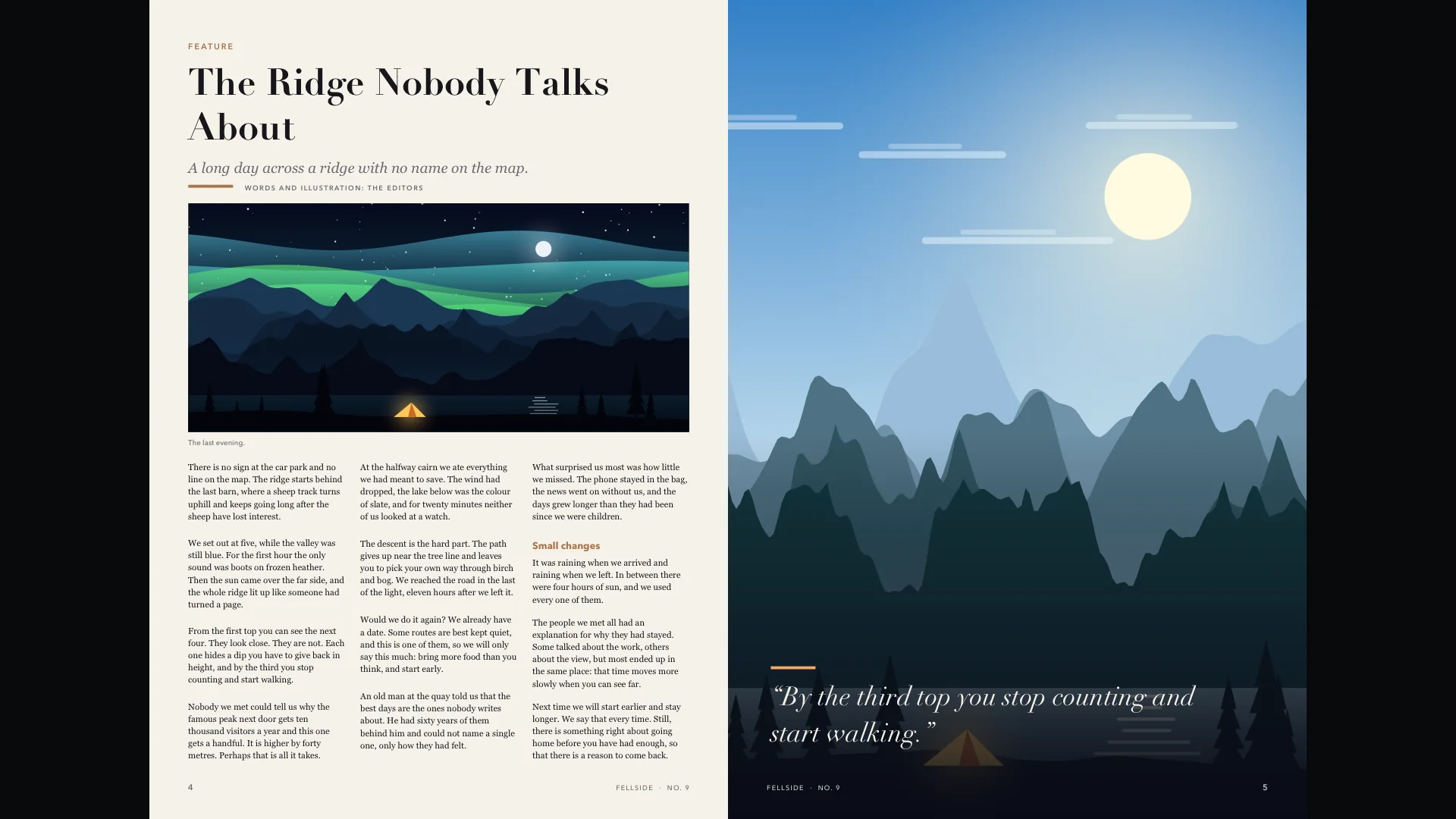
A reader app runs on the Apple TV, so your phone is free and the remote turns the pages. Blad draws every page for the TV in 4K and remembers where you were.
- Open the App Store on the Apple TV, search for Blad and download it. It is free to download, with five titles free.
- Open Sources and connect the storage where the PDF is, or choose Upload and send the file from your phone by scanning the QR code on the TV.
- Open the PDF from the library. Left and right turn the page, a click zooms to the width of the page and then closer, and Back takes you one step out.
More about what Blad does with a PDF: PDF reader for Apple TV.
And the other ways?
There are other PDF apps in the App Store on Apple TV as well; search for “PDF” there and compare. Some people turn the pages of a PDF into pictures and show them in Photos, which works for a handful of pages but gives up zoom and text. A USB stick does not help: Apple TV cannot read files from one.
Which should you use?
AirPlay is enough when
- you want to show one document once, in a meeting or to the family
- the file is already open on your phone or Mac
- you do not mind holding the device while you read
Blad is the better fit when
- you read on the TV regularly: magazines, books, comics or long documents
- you want whole spreads, and zoom that stays sharp in 4K
- your files are in a cloud service or on a NAS and you want them as a library with covers
- you want to read with the remote and leave your phone alone
Your files stay where they are.
Blad has no store and no catalogue. It reads the files you already have, from the storage you already use, and it only ever reads: nothing in your storage is changed, deleted or shared.
- Get BladOpen the App Store on your Apple TV, search for Blad and download it. The download is free, and so are the first five titles you open.
- Connect your storageOpen Sources and pick where your files are. For cloud services you sign in on your phone with a QR code, so there is no password to type with the remote. Then choose the folders and files Blad may read.
- ReadYour titles appear in the library with their covers. Click one, and Blad fetches the file to the Apple TV and opens it. Next time it opens on the page you left.
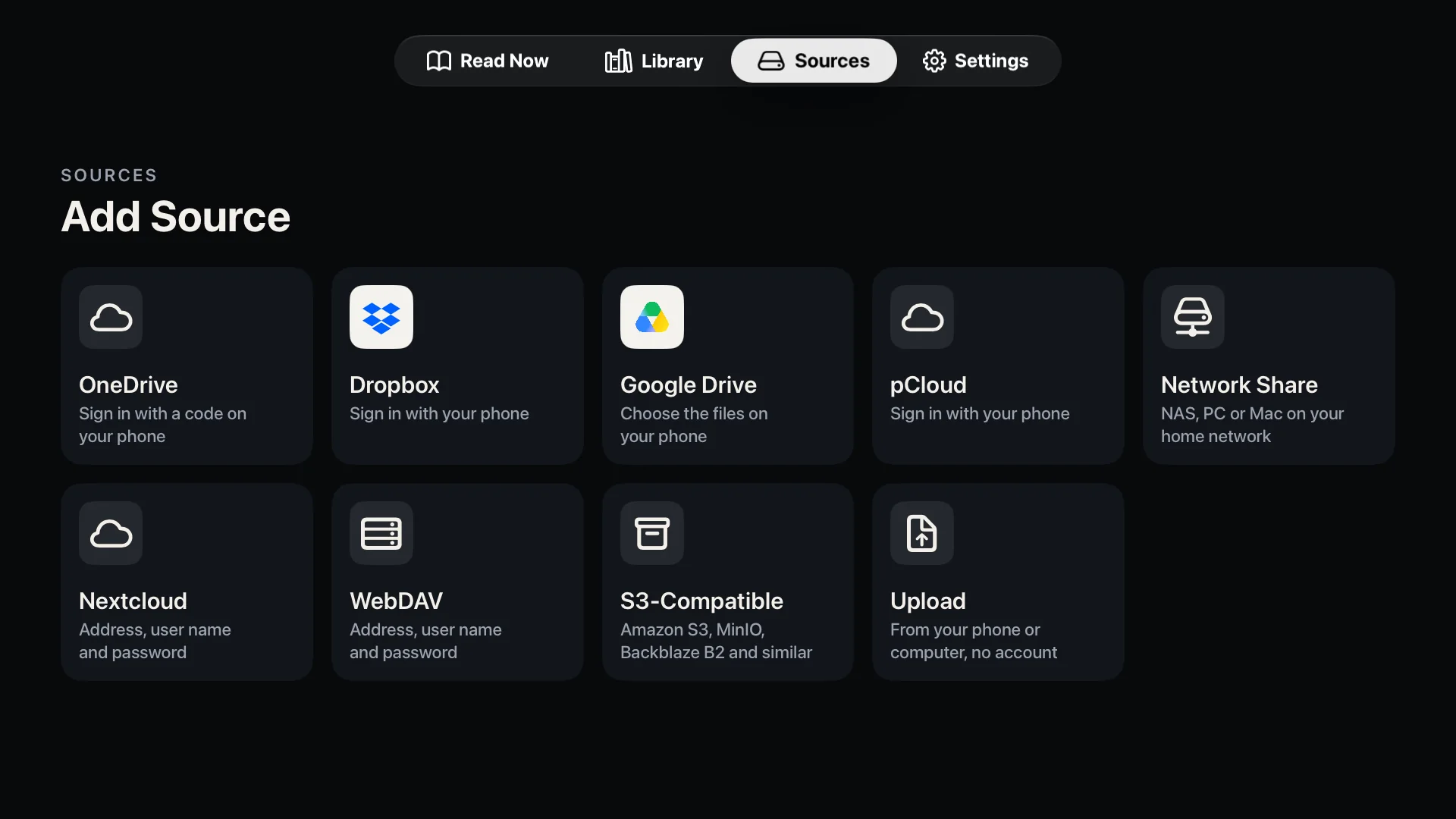
Blad reads from
- Cloud services
- OneDrive
- Dropbox
- Google Drive
- pCloud
- At home or on your own server
- Network shares (SMB)
- Nextcloud and WebDAV
- S3-compatible storage
- OPDS: Komga, Kavita, Calibre
- No account needed
- Straight from your phone
No cloud account and no server? Choose Upload under Sources, scan the QR code with your phone and send the files over your home network. Upload takes PDF, EPUB, CBZ and CBR files. Step by step on the support page.
The limits, stated plainly.
- Apple TV
- Any Apple TV running tvOS 26 or later.
- File formats
- PDF (also with a password), EPUB, and comics in CBZ, CBR and CBT. Not MOBI or Kindle formats, and not comic archives that have a password, are split into several files or are packed as 7z (CB7).
- Copy protection
- Files with DRM cannot be opened. That rules out most e-books bought with a lock, and magazines that only live inside another reading app.
- Text mode
- Showing a PDF page as plain text needs a page with real text. Scanned pages have none, and in a few PDFs the fonts do not say which letters they hold; Blad then says that the text cannot be read.
- Upload from a phone
- Takes PDF, EPUB, CBZ and CBR files. They are kept in the app's cache on the Apple TV, which tvOS can clear when space runs low, so keep your originals.
- Price
- Free to download, and the first five titles are free. After that, a single in-app purchase of US$8.99 unlocks the full version, with no subscription. The price in your country is shown in the app.
- Privacy
- No account with us, no analytics and no advertising. Privacy policy.
- Languages
- The app is in English and Norwegian.
- iPad and iPhone
- Blad for iPad is coming soon. There is no iPhone version yet.
Good to ask.
Can I AirPlay a PDF from my iPhone to Apple TV?
Yes, by mirroring the screen: open the PDF, open Control Center, tap Screen Mirroring and choose the Apple TV. The whole screen is shown, not just the document.
Is there a PDF app for Apple TV?
Yes. Blad is a PDF reader made for Apple TV. It is free to download, and the first five titles are free. There are other PDF apps in the App Store on Apple TV too.
Can I open a PDF from iCloud Drive on Apple TV?
Not directly in Blad: iCloud Drive is not among the sources on Apple TV. Mirror the file from your iPhone, iPad or Mac, or send it to Blad from your phone with Upload, where you can pick it from the Files app.
Can I read e-books and comics on Apple TV the same way?
Yes. Blad also opens e-books in EPUB and comics in CBZ and CBR, and has a library made for magazines.
Blad, format by format.
- PDF reader for Apple TVWhole spreads, sharp zoom and text mode for any PDF.
- Magazine reader for Apple TVWhole spreads in 4K, and a shelf that sorts issues by magazine.
- E-book reader for Apple TVEPUB in large, calm type, with bookmarks and search.
- Comic reader for Apple TVCBZ and CBR comics as two-page spreads, with zoom to page width and closer.
- Blad at workMeeting rooms, training rooms and the screen on the wall: what Blad does there, and its limits.
- SupportEvery source step by step, and how to reach us.

Your library, on the TV in your living room.
Blad for Apple TV is out now, only from the App Store on Apple TV. Blad for iPad is coming soon.